Make a GGEMS Project
GGEMS is a C++ library with a Python interface.
Template
A GGEMS macro must be written following this model:
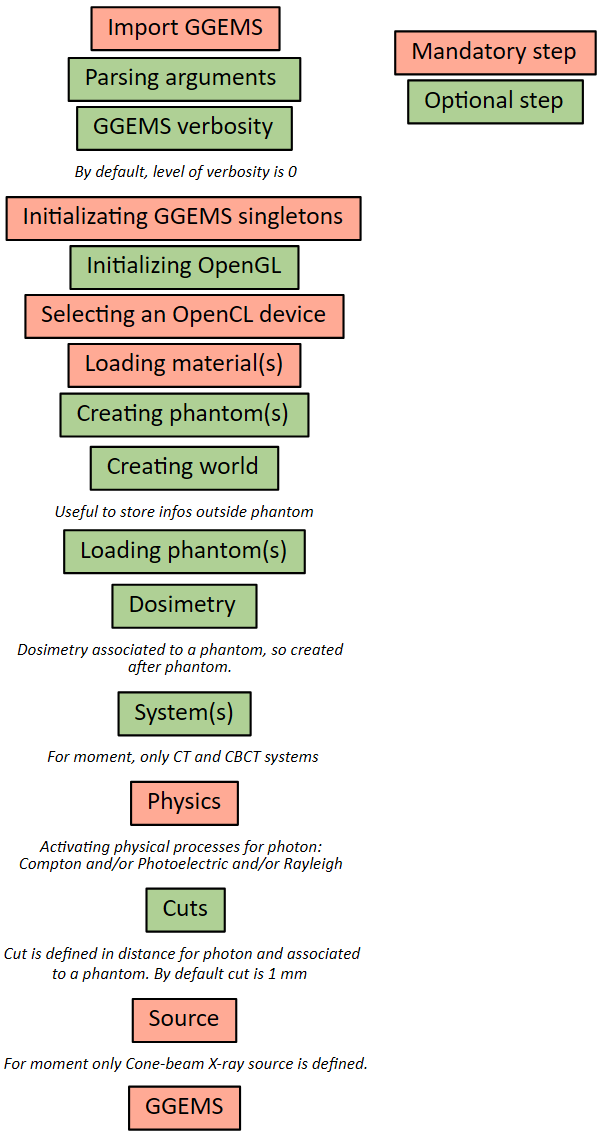
GGEMS macro using Python
Using GGEMS with python is simple. Here is a list of useful commands.
from ggems import *
Verbosity level is defined in the range [0;3]. For a silent GGEMS execution, the level is set to 0, otherwise 3 for lot of informations.
GGEMSVerbosity(0)
C++ singletons can be accessed via the following lines:
opencl_manager = GGEMSOpenCLManager()
opengl_manager = GGEMSOpenGLManager()
materials_database_manager = GGEMSMaterialsDatabaseManager()
processes_manager = GGEMSProcessesManager()
range_cuts_manager = GGEMSRangeCutsManager()
volume_creator_manager = GGEMSVolumeCreatorManager()
An OpenCL device could be selected.
opencl_manager.set_device_index(0)
A material database must be loaded in GGEMS. A material file is provided in GGEMS in ‘data’ folder. This file can be copy and paste in your project, and a new material can be added inside it.
materials_database_manager.set_materials('materials.txt')
Photon physical processes are activated using the process name, the particle name and the associated phantom name (or ‘all’ for all defined phantoms).
processes_manager.add_process('Compton', 'gamma', 'all')
processes_manager.add_process('Photoelectric', 'gamma', 'all')
processes_manager.add_process('Rayleigh', 'gamma', 'all')
Physical tables can be customized by changing the number of bins and the energy range. The following values are the default values.
processes_manager.set_cross_section_table_number_of_bins(220)
processes_manager.set_cross_section_table_energy_min(1.0, 'keV')
processes_manager.set_cross_section_table_energy_max(10.0, 'MeV')
Range cuts are defined in distance, particle type must be specified and cuts are associated to a phantom (or ‘all’ for all defined phantoms). The distance is converted in energy during the initialization step. During the simulation, if energy particle is below to a cut, the particle is killed and the energy is locally deposited.
range_cuts_manager.set_cut('gamma', 0.1, 'mm', 'all')
All verboses can be set to ‘True’ or ‘False’. In ‘tracking_verbose’, the second parameters is the index of particle to track. The method ‘initialize’ intializes all objects in GGEMS, and the simulation starts with the method ‘run’.
ggems = GGEMS()
ggems.opencl_verbose(True)
ggems.material_database_verbose(True)
ggems.navigator_verbose(True)
ggems.source_verbose(True)
ggems.memory_verbose(True)
ggems.process_verbose(True)
ggems.range_cuts_verbose(True)
ggems.random_verbose(True)
ggems.profiling_verbose(True)
ggems.tracking_verbose(True, 0)

ggems.initialize(seed) #using a custom seed
# ggems.initialize()
ggems.run()
And finally exit GGEMS properly:
ggems.delete()
exit()